If someone is writing for PsychDiscourse for the first time, give them a profile before you add them to an article. Search first so you don’t end up with two profiles for the same person.
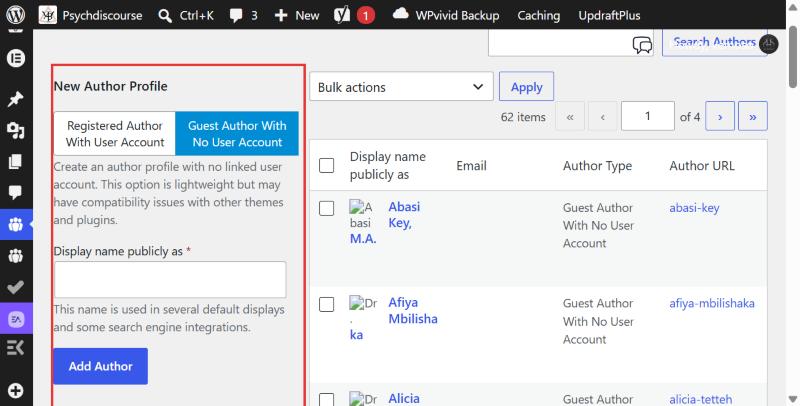
- Go to Authors, then Authors.
- Use Search Authors at the top right to make sure they aren’t already there.
- On the left, under New Author Profile, click the Guest Author With No User Account tab.
- Type their name in Display name publicly as, the way it should appear on articles. For example: Dr. Jane Smith, Ph.D.
- Click Add Author.
- Click their name in the list to add a bio and photo (see the next page).
- Go back to the article and add them in the Authors panel.
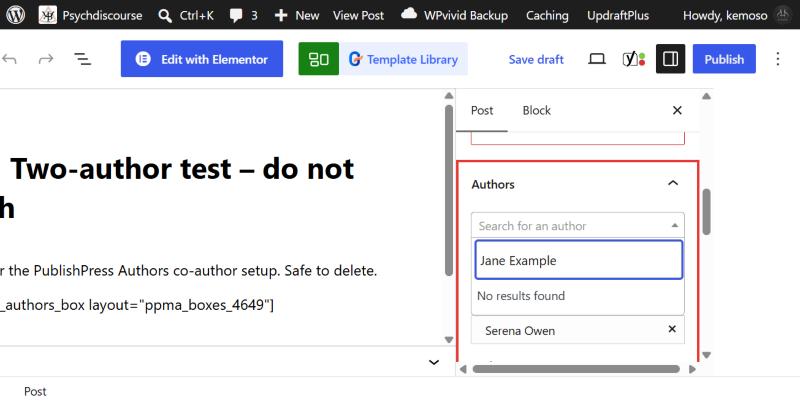
You can’t create an author from inside an article. The search there only finds people who already have a profile, and a new name just shows No results found.